
REVIEW · MADRID
Skip-the-line entrance to the Prado Museum with Digital Audio Guide
Book on Viator →Operated by Naturanda Turismo Ambiental · Bookable on Viator
Skip-the-line at the Prado pays off fast. This Naturanda ticket gets you into the museum with skip-the-line entry and a digital audio guide in 5 languages. You pick everything up near the Monument to Goya in Retiro.
I like that it runs as a private group activity, so it feels less crowded and more controlled. Pickup is offered if you want to reduce time on your feet. The main catch: headphones are not included, and the audio guide is app-based, so you’ll want a charged phone and your own headphones ready.
In This Review
- Key things to know before you go
- What you’re actually buying: Prado entry plus a phone audio tour
- Meeting at the Monument to Goya: logistics that make or break the day
- The app reality: POPGuide audio in multiple languages (and how to make it work)
- Prado self-guided pacing: seeing the main works without a live guide
- Duration reality: how to use 1 to 5 hours wisely
- Price and value check: is $35.68 a good deal?
- Who this works best for (and who should choose something else)
- Should you book this Prado skip-the-line with digital audio guide?
- FAQ
- Where is the meeting point?
- Does this include skip-the-line entry?
- Is a digital audio guide included, and what languages?
- Do I need to bring headphones?
- How long does the visit take?
- Is pickup available?
- Can I cancel for free?
Key things to know before you go

- Skip-the-line entry helps, but the museum is still a maze of crowds
- Your phone is the tour guide—download, open, and test before you get inside
- Headphones aren’t included, so plan to bring your own
- The audio guide may focus on select highlights, not every single artwork
- The meet-up is at the Goya monument, but it pays to arrive early and keep an eye out
What you’re actually buying: Prado entry plus a phone audio tour

At the heart of this experience is simple: you pay for admission to the Prado and a digital audio guide you listen to on your phone. It’s listed as skip-the-line, and in practice that usually means less waiting at the entrance—especially on busy days.
The audio guide is in 5 languages, and it’s designed to let you move at your own speed. That matters at the Prado, because you can’t really enjoy the paintings if you’re stuck in a long queue or forced into someone else’s pacing.
One more thing: this is not a live narration tour through the galleries. You’re doing a self-guided museum visit with guidance via the app. If you love a human voice explaining context, you may find this format a bit flat compared with a traditional docent-style tour.
You can also read our reviews of more guided tours in Madrid



Meeting at the Monument to Goya: logistics that make or break the day
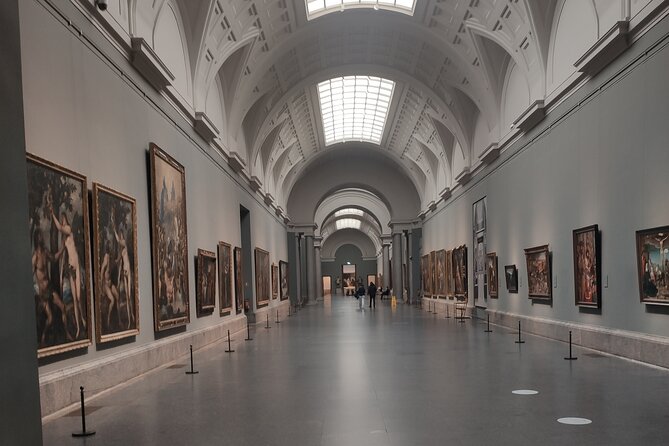
Your start point is the Monument to Goya area, at C. de Felipe IV, s/n, Retiro, 28014 Madrid. That’s helpful because it’s a recognizable landmark, and it’s near public transportation.
But here’s the practical advice: give yourself extra buffer time. Some people reported delays or confusion identifying the ticket agent, and it can be frustrating to stand around in the rain or heat while you’re trying to figure out what’s going on.
What I’d do to keep the day smooth:
- Arrive well before your scheduled time so you’re not stressed if there’s a lag.
- Have your booking details open on your phone.
- If you’re not seeing anyone, use the support channel that comes with your confirmation and keep trying until you get a clear instruction.
Also note: pickup is offered. If you choose it, confirm your pickup time clearly when you book. Less time walking across Madrid means fewer chances for last-minute confusion.
The app reality: POPGuide audio in multiple languages (and how to make it work)
The big part of your experience is the digital audio guide, delivered through an app (often described as the POPGuide / POP app). The instructions say an application should be downloaded, so treat that as a serious pre-trip task, not a last-minute convenience.
Plan for this:
- Bring your own headphones, since they’re not included.
- Make sure your phone battery is topped up.
- Expect that you may need data once you’re on site, especially if the app has to load content.
In terms of content, you should know the audio may feel like it covers highlights more than everything. Some people felt it didn’t match the museum’s breadth, and others said the app experience didn’t add much beyond what you can read on signs.
There are also app-friction stories—like difficulty getting the app set up or occasional crashes. You don’t need to panic, but you should be ready with a plan B: the museum’s own on-site information is there for a reason, and you can always switch to that if your phone acts up.
One more detail that’s worth checking before you arrive: if you’re traveling as a group, confirm how access works for each person’s device. Some situations described audio access not working well when multiple people were relying on one code or setup.
Prado self-guided pacing: seeing the main works without a live guide

Once you’re inside, you’re on your own route. That can be great. It means you don’t have to follow a strict script, and you can slow down where you actually care.
The tradeoff is that a self-guided plan can feel overwhelming at the Prado. The building is full of major paintings, side galleries, and multiple ways to loop through rooms. If you’re the type who likes a clear starting point and a recommended order, you might miss that structure.
For this kind of visit, I recommend you pick a goal before you enter. Examples:
- Hit the “must-sees” first while you still have energy.
- Leave time for wandering after you’ve covered the basics.
- Don’t try to “do it all.” The Prado punishes that impulse.
The skip-the-line part helps you arrive faster, but it won’t remove the reality of crowding inside. Even with quicker entry, you can still feel shoulder-to-shoulder in popular rooms. If you want maximum enjoyment, aim to spend your time calmly in the galleries that don’t get as much attention.
Duration reality: how to use 1 to 5 hours wisely

The experience is listed as 1 to 5 hours. That range tells you something: the format can work for short visits, but it also supports longer, more relaxed museum time.
Here’s a practical way to choose your time:
- 1 to 2 hours works if you’re confident you’ll stick to a shortlist of highlights and you don’t need every detail.
- 2 to 4 hours is the sweet spot for most people using an audio guide and taking breaks.
- 4 to 5 hours makes sense if you want to revisit rooms, slow down for specific styles, and spend time reading more than your app provides.
Your phone-based audio should help you manage the visit, but only if it’s working and actually matches what you want to see. If the app covers fewer works than you expected, you’ll naturally end up spending more time scanning labels and signs. That’s still enjoyable, just don’t assume you’ll get a perfectly guided itinerary from the screen.
You can also read our reviews of more museum experiences in Madrid






Price and value check: is $35.68 a good deal?
At $35.68 per person, you’re paying for three things:
- skip-the-line entry
- museum admission
- a digital audio guide in 5 languages
That can be good value if two conditions are met: the skip-the-line helps you enter quickly, and the audio guide adds more than just basic info. If both click, you end up with less waiting and a smoother visit than buying entry and figuring out your own plan on the fly.
When value feels worse, it usually comes down to breakdowns in the experience—not the museum itself. Some people reported problems like delayed ticket handoff or unclear audio access, and others felt the app content didn’t provide enough value compared with on-site options.
So my rule of thumb:
- If you’re traveling with limited time and you want an easy start, this format can be worth it.
- If you hate phone apps, rely on in-ear headphones you don’t want to bring, or want a tightly narrated tour, you may feel overcharged for the setup.
Who this works best for (and who should choose something else)

This experience suits you if:
- you’re comfortable with a self-guided museum visit
- you want to listen on a phone and control your own pace
- you’re okay using your own headphones
- you don’t mind that the app may focus on highlights
It may not be your best match if:
- you strongly prefer a live guide explaining context in real time
- you don’t want to troubleshoot apps in public (or you’re traveling with older devices)
- you need guaranteed help at the exact meet-up minute—because meeting-point issues can happen
Also, it’s a private activity, so your group is the only group participating. That’s a plus if you hate big crowds or you want a less chaotic experience at the start.
The Prado itself is worth your time regardless. The question here is whether you want the convenience of skip-the-line plus a phone audio layer, or whether you’d rather pay for a more structured, human-guided experience.
Should you book this Prado skip-the-line with digital audio guide?
I’d book it if you’re practical about self-guided museums and you can handle the phone audio setup. The skip-the-line entry is the strongest upside, and the 5-language app is convenient when it’s working well.
But don’t treat it like a guaranteed guided tour. Bring your own headphones, keep your phone charged, and arrive early at the Monument to Goya so you’re not stuck waiting. If you’re the type who needs a map, a narrator, and a tightly managed route, you’ll likely enjoy a live-guided option more.
If you do book, go in with the right mindset: you’re buying easier entry and an audio framework, not a full-on docent-led walk.
FAQ
Where is the meeting point?
Meet at the Monument to Goya, at C. de Felipe IV, s/n, Retiro, 28014 Madrid, Spain.
Does this include skip-the-line entry?
Yes. This experience is described as skip-the-line entrance to the Prado Museum.
Is a digital audio guide included, and what languages?
Yes. A digital audio guide is included in 5 languages.
Do I need to bring headphones?
Yes. Headphones are not included, so you should plan to use your own.
How long does the visit take?
It’s listed as 1 to 5 hours (approx.).
Is pickup available?
Pickup is offered. The details aren’t specified here, so confirm the pickup info when you book.
Can I cancel for free?
Yes. Free cancellation is available up to 24 hours in advance for a full refund.